Sales Summary - Summary Tab
The Summary tab is used to view an overview of sales information included on the Sales Summary report.

|
To access the Summary tab, select the Summary tab on the Report Results panel on the Sales Summary screen. |
The Summary tab is divided into the following sections:
- Overall Summary section
- Customer Summary section
- Transactions Summary section
- Interactions Summary section
 Overall Summary Section
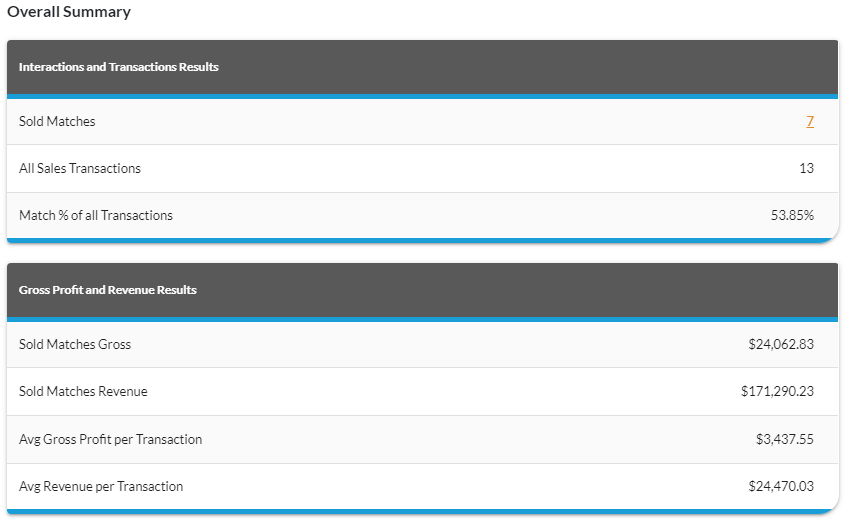
The Overall Summary section is used to review information regarding vehicle sales and gross profits. The Overall Summary section is divided into the Interactions and Transaction Results panel and the Gross Profit and Revenue Results panel.
Interactions and Transactions Results Section
The Interactions and Transactions Results panel is used to review the number of vehicles sold to prospects during the selected time period.
The following rows are available in the Interactions and Transactions Results panel.
Sold Matches: (Link) The total number of vehicles sold to XtreamService prospects displays as a link. Click this link to display the Detailed Results window, where details of the transactions can be reviewed.
The following fields display only when Deal Date is selected in the Type field in the Report Criteria section.
All Sales Transactions: The total number of vehicles sold during the selected time period displays.
Match % of all Transactions: The percentage of vehicles sold to XtreamService prospects during the selected time period displays.
The following fields display when Lead Date is selected in the Type field in the Report Criteria section.
Total Leads Sent: The total number of leads sent to the Customer application during the selected time period displays.
Closing Rate: The percentage of leads sent to the Customer application that resulted in vehicle sales displays.
Gross Profit and Revenue Results Section
The Gross Profit and Revenue Results panel is used to review gross profit and revenue data for vehicles sold to prospects during the selected time period.
The following rows are available in the Gross Profit and Revenue Results panel.
Sold Matches Gross: The gross profit per vehicle displays for vehicles sold to XtreamService prospects.
Sold Matches Revenue: The revenue per vehicle displays for vehicles sold to XtreamService prospects.
Avg Gross Profit per Transaction: The average gross profit per vehicle for vehicles sold to XtreamService prospects displays.
Avg Revenue per Transaction: The average revenue per vehicle for vehicles sold to XtreamService prospects displays.
Customer Summary Section
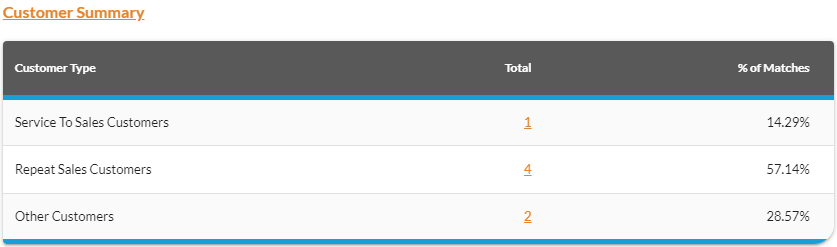
The Customer Summary section is used to review information regarding various types of customers, such as repeat sales customers. The title of this section displays as a link, which can be used to access the Customers tab of the report.
Note - This section is only available when Deal Date is selected in the Type field in the Report Criteria section.
The following columns are available in the Customer Summary section.
Customer Type: The type of customers displays.
The following types of customers can display.
- Other Customers. These customers have no previous sales or service history with the dealership; however, they purchased vehicles during the report time frame.
- Repeat Sales. These customers have sales history with the dealership and purchased vehicles during the report time frame.
- Service to Sales. These customers have service history but no previous sales history with the dealership; however, they purchased vehicles during the report time frame.
Total: (Link) The total number of vehicle sales for the corresponding customer type displays as a link. Click this link to display the Detailed Results window, where details of the transactions can be reviewed.
% of Matches: The percentage of total vehicle sales for the customer type displays.
Transactions Summary Section
The Transactions Summary section is used to review information regarding vehicle sales based on the type of vehicle deal and the type of vehicle included on the deal. The title of this section displays as a link, which can be used to access the Transactions tab of the report.
Note - This section only displays when Deal Date is selected in the Type field in the Report Criteria section.
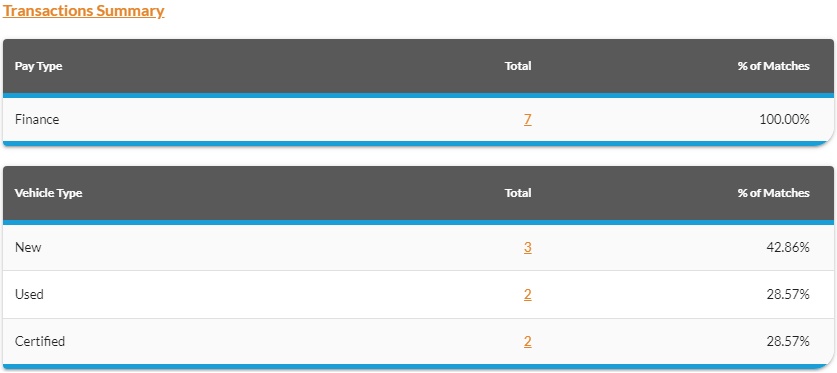
The Transactions Summary section is divided into the Pay Type section and the Vehicle Type section.
Pay Type Section
The Pay Type section is used to review the number of vehicles that were sold based on the type of vehicle deal, such as finance or lease.
The following columns are available in the Pay Type section.
Pay Type: The type of vehicle deal, such as Finance or Lease, displays.
Total: (Link) The total number of vehicle sales for the corresponding pay type displays as a link. Click this link to display the Detailed Results window, where details of the transactions can be reviewed.
% of Matches: The percentage of vehicle sales for the corresponding pay type displays.
Vehicle Type Section
The Vehicle Type section is used to review the number of new, used, and certified vehicles sold during the selected time period.
The following columns are available in the Vehicle Type section.
Vehicle Type: The category of vehicle sold, such as New or Used, displays.
Total: (Link) The total number of vehicle sales for the corresponding vehicle category displays as a link. Click this link to display the Detailed Results window, where details of the transactions can be reviewed.
% of Matches: The percentage of vehicle sales for the corresponding vehicle category displays.
Interactions Summary Section
The Interactions Summary section is used to review information, such as the number of vehicles sold to XtreamService prospects, divided based on the type of customer interaction. Customer interactions are instances in which dealership personnel are in contact with customers, such as during a service appointment or through a sales campaign. The total number of vehicles sold to XtreamService prospects for each type of customer interaction displays as well as the gross profit. The title of this section displays as a link, which can be used to access the Interactions tab of the report.
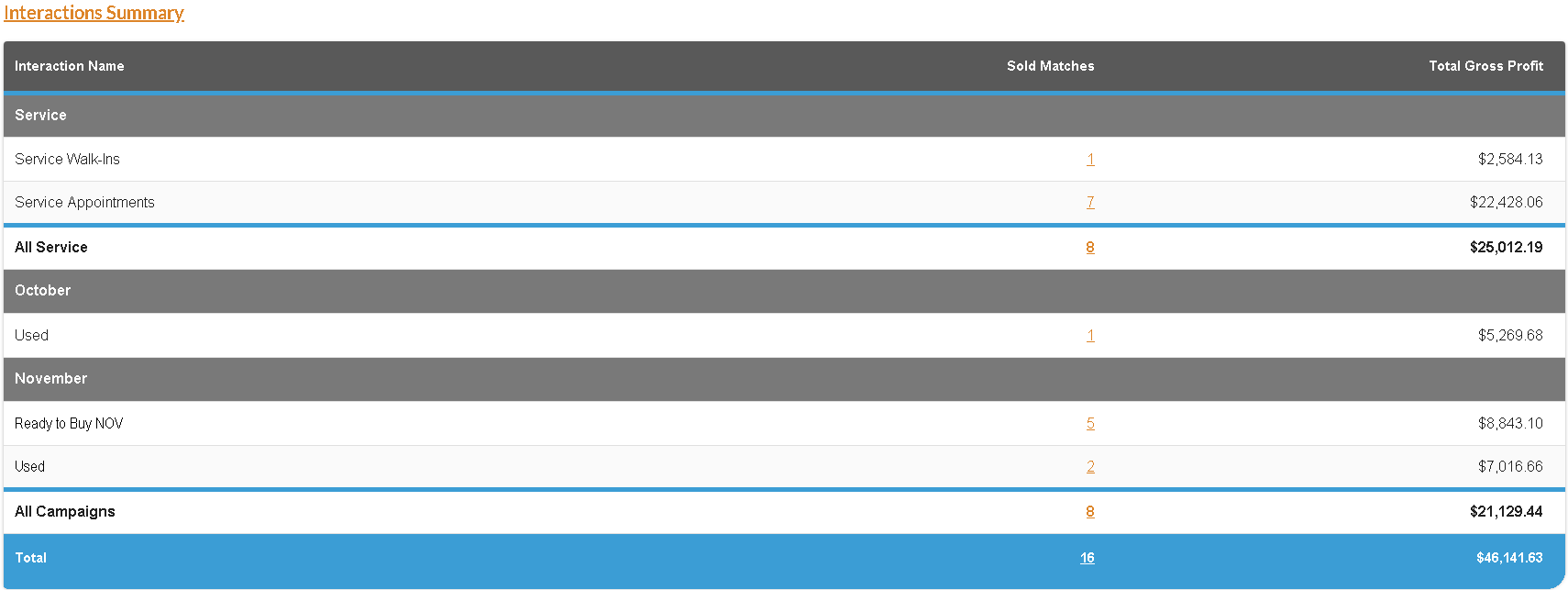
The following columns are available in the Interactions Summary section.
Interaction Name: The name of the interaction, such as Service Walk-Ins, displays.
Sold Matches: (Link) The number of vehicle sales matched to the corresponding interaction displays as a link. Click this link to display the Detailed Results window, where details of the transactions can be reviewed.
Total Gross Profit/Revenue: The gross profit or revenue generated by vehicle sales matched to the corresponding interaction displays.
The following column is only available when Lead Date is selected in the Type field in the Report Criteria section.
Total Leads Sent: The total number of leads sent to FOCUS or the Customer application in the Digital Retail Platform for the corresponding interaction displays.
Click here for a list of products that may be mentioned in this help file.